Quick answer
The official UK ETA app is a legitimate way to apply for a UK electronic travel authorisation. It is listed on GOV.UK alongside the online form. You need your passport, an email address and a way to pay the £20 fee. A decision usually arrives by email within one day.
Checked on 11 November 2026 against GOV.UK: Using the UK ETA app.
- Fee: £20 per person. The fee is not refunded after you apply.
- Language: the app is available in English only.
- iPhone: iPhone 7 or later, running iOS 16 or later.
- Android: Android 12 or later, with NFC so the app can read your passport chip.
- Decision: usually within one day by email. It can take up to 3 working days.
- Validity: 2 years, or until your passport expires, whichever comes first.
On this page
Is the UK ETA app legit?
Yes. The UK ETA app is an official UK government channel for ETA applications. GOV.UK names two ways to apply: the online form and the UK ETA app. Both cost the same, £20.
Official information is on gov.uk/eta. The online form runs on apply-for-an-eta.homeoffice.gov.uk, and you reach it from GOV.UK.
An ETA lets you visit the UK, Jersey, Guernsey or the Isle of Man for up to 6 months. It does not guarantee entry to the UK. You can only get an ETA if your nationality is on the GOV.UK list of eligible countries. If it is not, you need a visa. See Do I need a UK ETA? and UK ETA or visa?
What you need before you start
- The passport you will travel with. Your ETA is linked to that passport. If you get a new passport, you need a new ETA.
- An email address. The decision is sent there.
- A way to pay. You can use a payment card, Apple Pay or Google Pay.
- A compatible phone. You need an iPhone 7 or later with iOS 16 or later, or an Android phone with Android 12 or later and NFC.
- Parent contact details for under-18s. If the applicant is under 18, you must give the contact details of someone with parental responsibility.
For the full eligibility rules, see UK ETA requirements.
How to apply with the UK ETA app
- Download the UK ETA app. Check that your phone meets the iOS or Android requirements first.
- Turn on NFC if you use Android. The app needs NFC to read the chip in your passport.
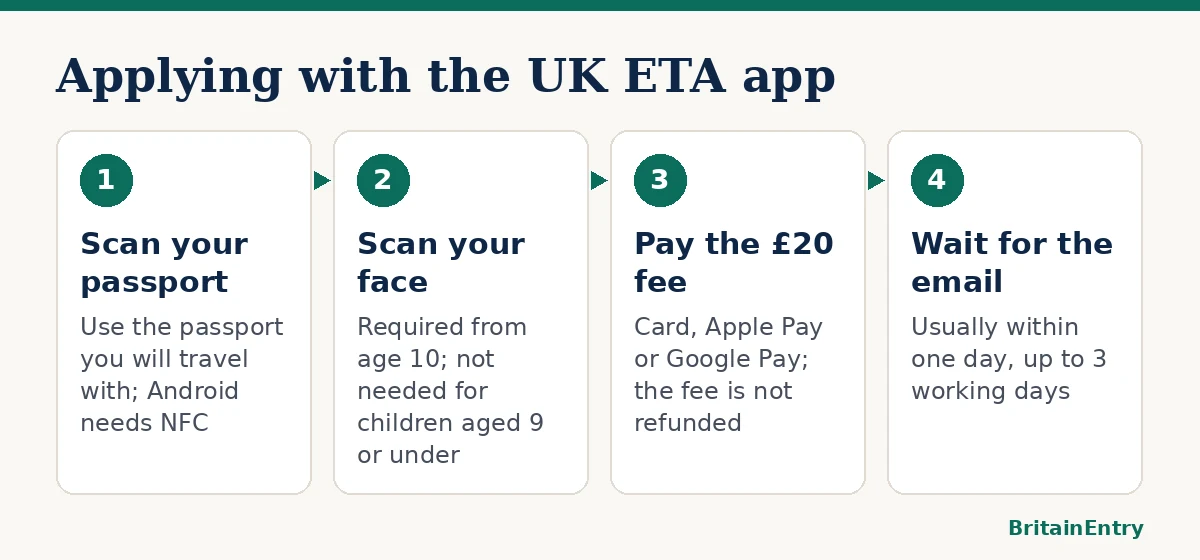
- Scan your passport. Use the passport you will travel with. Follow the on-screen prompts to read the passport details and chip.
- Scan your face. This is required for anyone aged 10 or over. Children aged 9 or under do not need a face scan.
- Answer the questions. Give your contact details and answer the questions. For an applicant under 18, add the details of a person with parental responsibility.
- Pay the £20 fee. Use a payment card, Apple Pay or Google Pay. The fee is not refunded after you apply.
- Wait for the email. You usually get a decision within one day. It can take up to 3 working days. Do not travel to the UK until you get the email confirming your ETA.
Applying for someone else
You can apply for another person in the app only if that person is with you. This matters for the passport and face scans. If the person is not with you, apply for them using the online form instead. Every traveller needs their own ETA, including babies and children. There is no family or child discount.
Common mistakes
- Using the wrong passport. The ETA works only with the passport in your application. If you travel with a different one, you need a new ETA.
- Applying too late. Most decisions are quick, but some take up to 3 working days. The Home Office advises applying at least 3 working days before you travel.
- Travelling before the confirmation email. Wait for the email confirming your ETA.
- Scanning someone who is not present. Use the online form for anyone who is not with you.
- Assuming the fee is refundable. The £20 is not refunded after you apply, whatever the outcome.
- Applying when you need a visa. If your nationality is not on the eligible list, an ETA is not available.
FAQ
Can I use the UK ETA app for my children?
Yes, if they are with you. Each child needs their own ETA and pays the full £20. Children aged 9 or under do not need a face scan. For anyone under 18, you must give the contact details of a person with parental responsibility.
What if my phone does not have NFC?
An Android phone needs NFC to read the passport chip. If your phone has no NFC, apply using the online form instead.
How long does the app take to give a decision?
Most decisions arrive by email within one day. Some take up to 3 working days. Do not travel until you receive the confirmation email.
Does an approved ETA mean I will be let into the UK?
No. An ETA does not guarantee entry. A Border Force officer still decides at the border.
Do I need a new ETA if I renew my passport?
Yes. Your ETA is linked to the passport you applied with. A new passport needs a new ETA. You can find more answers in UK ETA questions and answers.
Sources
- GOV.UK: Using the UK ETA app
- GOV.UK: Get an ETA – How to apply
- GOV.UK: Get an ETA – Overview
- GOV.UK: Check when you can get an ETA
This guide is general information, not legal or immigration advice. BritainEntry is an independent website and is not connected with the UK government.